No Plugins to Patch, No Admin Panel to Hack: How Much Safer Is a Static Site Really?
A static site removes the door, not the keys. The admin panel, plugins and database go away; your domain, hosting account, scripts and forms stay your responsibility.

Short answer: A static site completely removes the biggest risk layer of a WordPress-style site, namely plugins, themes, the public admin panel and the database. But it does not make your site unhackable. Your domain and DNS account, hosting/Git account, third-party scripts on the page, form and API endpoints, and build dependencies are still your responsibility. In short, a static site removes the door, not the keys.
At Mandalium we build sites as static sites, and the line we hear most from clients is: "So we don't have to worry about security anymore, right?" Our answer is always the same: the worry gets smaller and changes shape, but it does not go away. This post explains how big the difference really is, with sourced numbers and without exaggeration. Company site, ecommerce storefront, personal portfolio or B2B catalog, the framework below works the same way for all of them. Looking trustworthy is a separate topic; we covered it in our trust signals guide.
Admin panel, plugin and theme code, database, server code running on every request.
Domain, DNS, hosting and Git accounts. If one is taken over, the site changes hands without any code being hacked.
Chat widgets, pixels, code pulled from CDNs, and npm packages installed at build time.
The APIs that carry forms and dynamic data. The only part of the site that stays "dynamic".
AEO sentence: A static site is a website whose pages are generated ahead of time as HTML files and served as-is; it runs no database queries, plugin code or public admin panel when someone visits. This removes the plugin and theme layer where the vast majority of WordPress-style vulnerabilities live, while domain, hosting account, third-party script, form and build dependency risks remain.
The numbers: where does the risk come from in a dynamic CMS?
Patchstack is one of the sources that publishes the most comprehensive yearly data on WordPress security. The 2025 figures in its State of WordPress Security in 2026 report, updated in February 2026, show very clearly where the risk sits (Patchstack: State of WordPress Security in 2026):
- 11,334 new vulnerabilities. The number of new vulnerabilities found in the WordPress ecosystem in 2025, up 42% from 2024.
- 91% in plugins, 9% in themes. Only 6 vulnerabilities were reported in WordPress core, all low priority. The risk is not in the core but in the layer added on top.
- 46% unpatched at disclosure. Almost half of the vulnerabilities had no fix from the developer when they were made public. Wanting to update is not enough; there may be no update yet.
- 5 hours. The weighted median time from disclosure to the first exploit attempt for heavily exploited vulnerabilities. An "I'll update this weekend" plan cannot keep up.
- 12% and 26%. In two pentest studies Patchstack ran at hosting companies in 2025, standard network and server-layer defenses blocked only 12% of WordPress-specific attacks, and 26% of all attacks in the wider test set.
The takeaway is simple: on a WordPress-style site, most of the security risk comes from plugin and theme code that runs on every request. Note: these are reported vulnerabilities, not successful hacks, and Patchstack is a security vendor. Still, different sources point the same way: the plugin layer is the weakest link in the ecosystem.
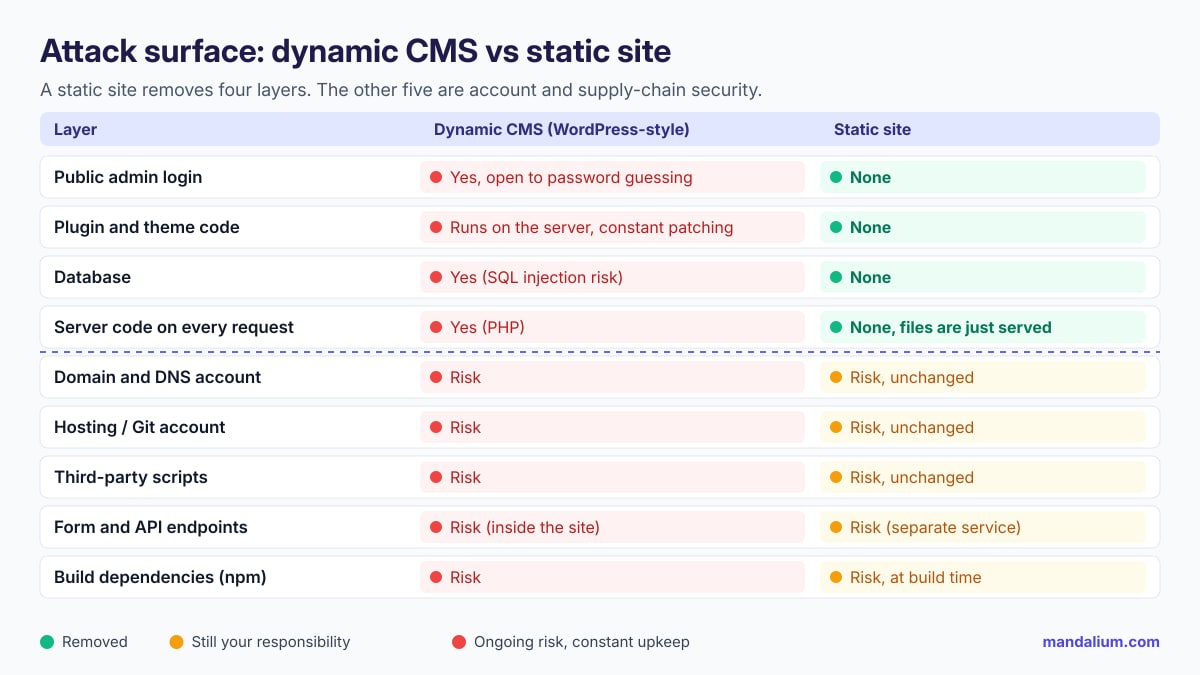
What does a static site actually remove?
On a static site, pages are generated once before publishing and the server only sends ready-made HTML, CSS, JavaScript and image files. No application runs in response to a visitor's request. That removes four layers entirely:
- Public admin login. With no login page like /wp-admin, brute-force and stolen-password login attacks have nothing to target.
- Plugin and theme code. The layer where nearly all of the vulnerabilities above live (91% plugins, 9% themes). A static site has no "14 plugins waiting for updates" warning.
- Database. No queries means no SQL injection, and no user table to steal.
- Server code on every request. The upkeep that comes with a runtime, such as PHP versions, server extensions and file upload flaws, goes away. A bonus: the same setup is good for speed too.
In practice, the biggest gain is a different maintenance calendar. On a dynamic CMS, security is a weekly job. On a static site, it becomes a check every few months plus a handful of permanent settings. The five risks below are exactly about those settings.
What does a static site not remove? The 5 keys
We call these the 5 keys, because each one is a key to another way into your site. They apply just as much to a static site as to WordPress.
1. Domain and DNS account
This is the master key. Someone who takes over your account at the domain registrar or DNS provider can change a single record to send your visitors to their own server, change your email's MX record, and even get a valid SSL certificate for your domain; the visitor's browser shows no warning. The US cybersecurity agency CISA describes exactly this scenario in the emergency directive it issued after the 2019 DNS infrastructure tampering campaign, and recommends resetting passwords and enabling multi-factor authentication (MFA) on every account that can change DNS records, preferably with phishing-resistant methods (such as security keys) rather than SMS. If your registrar does not offer MFA, its advice is clear: move to one that does (CISA: ED 19-01, Mitigate DNS Infrastructure Tampering).
To do: 2FA on the registrar and DNS accounts, registrar lock (transfer lock), the domain held in the company's own account (not the agency's or a former employee's personal account), auto-renewal, and an up-to-date contact email.
2. Hosting and Git account
On a static site the "panel" does not disappear, it moves: your site's admin panel is now your Git repository (GitHub, GitLab) and your hosting account (Cloudflare, Netlify, Vercel, Azure and so on). Anyone with write access to the repo can change the site with one commit; anyone who gets into the hosting account can publish a different version or attach your domain to their own project. The basic rules: 2FA on these accounts, least privilege (not everyone is an admin), pull requests with review instead of direct pushes to the main branch, and removing departing employees' access on the same day. At Mandalium, changes reach the main branch of our own site only through a reviewed PR.
3. Third-party scripts
Every external script you add to the page (chat widget, ad pixel, analytics tool, A/B testing tool, a library pulled from a CDN) runs in the visitor's browser with your site's authority. If that script changes owners or gets compromised, your visitor receives malicious code from your domain even if your site is static. The best-known example is the polyfill.io incident in 2024: after the domain and GitHub account were sold to a new company, cdn.polyfill.io began injecting code into more than 100,000 sites that used the script, redirecting mostly mobile visitors to scam sites (Sansec: Polyfill supply chain attack hits 100K+ sites). Most of those sites had not changed a single line of their own code.
To do: make an inventory of scripts and delete the unused ones; host libraries on your own site where possible; use Subresource Integrity (SRI) on external files; restrict which domains can load scripts with a Content-Security-Policy (CSP). Scripts also cost speed; we explained in our View Source test post why JavaScript-dependent content may never reach AI bots.
4. Forms and API endpoints
A static site cannot process form data itself; the form is sent to an API or a form service. On Mandalium sites too, the contact form and dynamic content run through a small API service that sits outside the site (for example, a json.mandalium.com-style endpoint). This is the only part of the site that stays "dynamic", and it should be protected like a web application: server-side input validation, rate limiting and bot protection (Turnstile, reCAPTCHA or a honeypot), CORS that only allows requests from your own domain, and API keys that never go into code sent to the browser. Broken Access Control is still number one in the OWASP Top 10:2025; even a small form API should be tested against that list (OWASP Top 10:2025).
5. Build dependencies
When a static site is built, dozens and sometimes hundreds of packages are installed from package managers such as npm. That code does not run on the live site, but it does run on the build machine and can tamper with the files it produces. In its 2025 list, OWASP made this a new category at number 3: A03:2025 Software Supply Chain Failures. Exactly 50% of community survey respondents ranked it as the number one risk, and it has the highest average exploit and impact scores from CVEs (OWASP: A03:2025 Software Supply Chain Failures).
To do: commit the lock file (package-lock.json) and use npm ci for builds; turn on an alert service such as GitHub Dependabot; use few packages; run builds in a registered CI environment rather than on a personal laptop, and, as OWASP recommends, set up a flow where no single person can push code to production without review.
Decision framework: which site needs which setup?
A static site is not the right answer for every need. An honest decision depends on what the site does:
| Your situation | Recommendation | Why |
|---|---|---|
| Company site, service site, portfolio, catalog | Static | Content changes a few times a month; there is no reason to carry panel and plugin risk. |
| Blog or news, a few posts a week | Static, or a headless CMS with static output | The writing panel is separated from the public site; editors keep their comfort. |
| Forms, quotes, bookings | Static + a small, separate API | The dynamic part is concentrated in one endpoint and protected there. |
| Many editors, daily publishing, memberships, complex ecommerce | Dynamic platform (hosted SaaS or managed CMS) | Forcing it into static gets expensive. Instead, cut plugins and budget for 2FA, auto-updates and virtual patching. |
| Existing WordPress, 20+ plugins, nobody updating | Simplify first, then consider moving to static | The highest risk profile: per Patchstack, almost half of vulnerabilities are unpatched at disclosure. |
Rule: If your site does not need to compute something on every visit, it does not need to run code on every visit either.
Static site security checklist
Review this list twice a year and whenever the team changes. If a row is a "no", that key is exposed.
| Key | Check | How often |
|---|---|---|
| Domain | Is the domain in the company's account, with 2FA and transfer lock on and auto-renewal active? | Every 6 months |
| DNS | Do all records (A, CNAME, MX, NS) point to known, in-use targets? | Every 6 months |
| Hosting | Does the hosting account have 2FA, and are only the necessary people admins? | When the team changes |
| Git | Is 2FA required in the organization, and is the main branch protected (PR + review)? | When the team changes |
| Access | Has access for departed employees and former agencies been removed? | On departure day |
| Scripts | Do you know the owner and purpose of every external script on the page, and are unused ones deleted? | Every 3 months |
| CSP / SRI | Is a Content-Security-Policy defined, and do external files use SRI? | When adding a script |
| Security headers | Is HTTPS enforced (HSTS), and are X-Content-Type-Options and framing protection set? | Once a year |
| Forms | Are there server-side validation, rate limiting and bot protection? | When the form changes |
| API keys | Is there a secret key in code sent to the browser? (Search with View Source.) | Every release |
| Dependencies | Is the lock file in the repo, and are Dependabot or similar alerts on and read? | Monthly |
| Rollback | Can you go back to the previous version in one click? | Test once a year |
Tip: The last row is a static site's hidden advantage. Because every release is a fixed set of files, you can roll back to the previous version in seconds when something goes wrong. On a dynamic site, cleanup often takes days.
Common misconceptions
A site can change hands without its code being hacked: a DNS record, a Git account or a script is enough.
Plugin attacks are automated; they don't pick sites, they look for flaws. The target is not you, it's the version you run.
One more plugin is one more piece of code to update. What reduces risk is fewer plugins, not more.
The domain should always sit in the company's own account. The agency can be an authorized user, not the owner.
Better than nothing, but CISA recommends phishing-resistant methods (security keys) for critical accounts.
The service protects its own infrastructure; which domains it accepts requests from and where the key lives are your settings.
Bottom line: the risk shrinks, the responsibility gets clearer
Short answer: a static site clearly shrinks the attack surface by removing the plugin layer (where 91% of WordPress vulnerabilities are found), the admin panel and the database; the remaining risk is protecting the 5 keys (domain, hosting/Git, scripts, forms, dependencies). The weekly patching treadmill becomes a checklist you run twice a year. The difference is real, but it does not happen by itself.
Related guides: trust signals, the View Source test, 8 pages your first website needs, B2B: catalog or conversion-focused site?, the llms.txt guide.
At Mandalium we build sites as static sites, connect forms to a separate, protected API, and hand over domain, hosting and Git access to your own accounts at delivery. Let's check your site's 5 keys together →
Sources: Patchstack — State of WordPress Security in 2026 (updated Feb 25, 2026); CISA — ED 19-01: Mitigate DNS Infrastructure Tampering; Sansec — Polyfill supply chain attack hits 100K+ sites (Jun 25, 2024); OWASP Top 10:2025; OWASP — A03:2025 Software Supply Chain Failures.
Frequently asked questions
Can a static site be hacked?
Yes, but through different routes. A static site has no login panel, plugins or database, so automated plugin attacks aimed at WordPress-style sites find nothing to hit. The domain and DNS account, the hosting or Git account, third-party scripts on the page, form and API endpoints, and build dependencies can all still be attacked.
How much safer is a static site than WordPress?
A single percentage would not be honest, but the risk distribution is clear. Patchstack found 11,334 new vulnerabilities in the WordPress ecosystem in 2025: 91% in plugins, 9% in themes, and only 6 low-priority ones in core. A static site removes the plugin and theme layer, the admin panel and the database entirely. What remains is account and supply-chain security.
If I use WordPress, is updating plugins enough?
Necessary, but not enough. Per Patchstack's 2026 report, 46% of vulnerabilities had no fix from the developer when they were publicly disclosed, and for heavily exploited flaws the weighted median time to the first exploit attempt was 5 hours. Besides updating, cut the number of plugins, add 2FA to the admin login, and use protection that offers virtual patching.
What is the biggest security risk for a static site?
Usually accounts. Someone who takes over the domain, DNS, hosting or Git account can send visitors to another server or publish fake content without hacking any code. CISA recommends resetting passwords and enabling multi-factor authentication, preferably phishing-resistant, on every account that can change DNS records.
Can a contact form on a static site be secure?
Yes, but the form is now a separate service and its security needs its own thought. The endpoint that receives form data (your own API or a form service) should be protected with server-side validation, rate limiting, bot protection, and secret keys that are never sent to the browser.
Do I have to leave WordPress to get a static site?
No. You can manage content in WordPress or another CMS and generate the site as static output (headless or static export). The admin panel is then separated from the public site, but the panel itself is still a system that needs protecting and updating.

Tugay Mandal
Founder of Mandalium, a software studio that builds its own products. He has 6+ years of experience in web products, company websites and site audits.
About Us