Google Traffic Down but Sales Holding? How to Read Zero-Click Search After AI Overviews
Organic clicks are falling on the chart, but nothing has changed at the till. Before you panic, tell healthy zero-click search apart from a real loss.
Short answer: if clicks from Google are falling while sales and qualified leads hold steady, you are most likely seeing zero-click search, not a loss: people get part of the answer in AI Overviews or AI Mode, and the ones ready to buy still come to you. To confirm rather than assume, put Search Console, GA4, and CRM data in one table and work out which of four situations you are in.
Many teams know the scene: the monthly report shows organic traffic pointing down, someone asks "Is SEO broken?", and sales says demand hasn't dropped. Both can be right. This post is a diagnostic guide: it helps you separate a normal drop from an urgent one and decide what to measure instead of raw traffic. To see how AI tools describe you, start with the 20-minute AI visibility check; for the concepts, see SEO, AEO and GEO.
Impressions, CTR, position; by query and page, split branded vs non-branded.
Organic conversions, lead quality, and referral traffic from AI assistants.
Lead volume, closed deals, and "How did you hear about us?" answers.
Read traffic and sales together and place yourself in one of four quadrants.
AEO sentence: Zero-click search is when a user gets the answer on the Google results page (AI Overviews, AI Mode, a featured snippet, or the map pack) and ends the search without clicking through to a site. If impressions hold while clicks and CTR fall, but sales, leads, and branded search hold too, it is not a ranking loss but a healthy zero-click effect.
What is zero-click search, and what did AI Overviews change?
Zero-click search isn't new: weather, exchange rates, opening hours, and featured snippets have answered people on the results page for years. AI Overviews and AI Mode extended this to more complex questions. On informational searches like "what is X, how do I do it, which is better?", people can read the summary and stop there; even when your link appears inside the answer, the click may never come.
The key point: visibility and visits are no longer the same thing. When your site is shown as a source in an AI answer, Search Console records an impression; if nobody clicks, no click is recorded. Result: impressions hold, CTR drops. Users with buying intent usually still come to the site to compare, ask for a price, or get in touch. So a large part of the lost traffic may be "read and leave" visits that never converted anyway.
- AI data is already in Search Console. According to Google's documentation, appearances in AI Overviews and AI Mode are counted in the Performance report under the "Web" search type (Google Search Central: AI features and your website).
- There is also a separate AI impressions report. Search Console's Generative AI performance report shows AI Overviews and AI Mode impressions by page, country, device, and date; it does not break down clicks or queries (Search Console Help: Generative AI performance report).
- Don't add the two reports together. AI impressions are already included in the overall Performance report; adding the AI report on top double-counts them.
The Traffic × Sales Matrix: a four-quadrant read
Here is the simple framework we use in Mandalium client reports: put Google organic clicks on the horizontal axis and your sales or qualified lead signal on the vertical axis. Compare the period with the same period last year and place yourself in one of four quadrants. Traffic alone says little; it gains meaning when read next to sales.
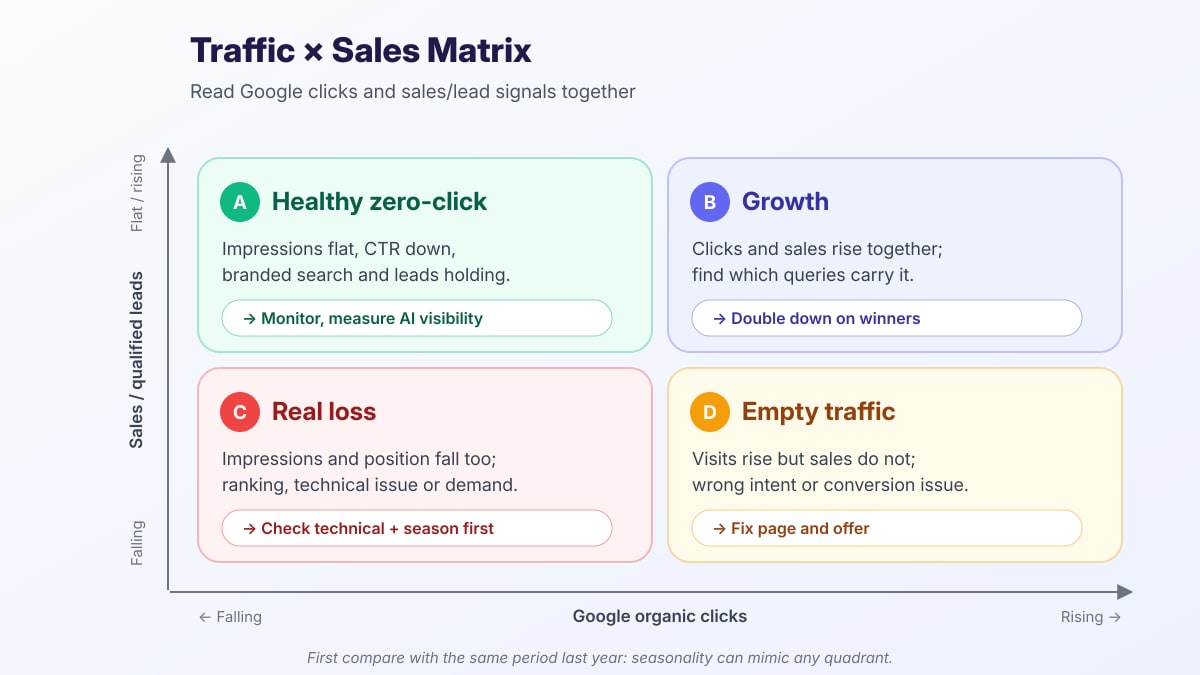
Clicks fall, sales and leads hold. Impressions and position are flat, CTR is low, especially on informational queries. No panic; measure whether AI answers cite you.
Clicks and sales rise together. Find which queries and pages carry the growth and build more of them.
Clicks and sales fall together. If impressions and position are down too, the cause is ranking, a technical fault, or lower market demand. Diagnose urgently.
Visits rise but sales don't. You're getting traffic from the wrong intent or losing conversions on the page; the problem is the page and the offer, not traffic.
Diagnosing in Search Console: five comparisons
Start with Search Console's Performance report. Turn on all four metrics (clicks, impressions, CTR, average position) and, in the date comparison, use both the previous period and the same period last year.
- 1. Read impressions and clicks separately. If impressions are flat or rising while clicks and CTR fall, your visibility is intact but the click stays on the results page. If impressions fall too, you have lost visibility.
- 2. Check position. If average position is flat while CTR drops, the results page layout changed, not your ranking. If position slipped several places, that's a classic ranking loss.
- 3. Go query by query. In the Queries tab, list the 20 queries that lost the most clicks. Are they "what, how, why" informational queries, or "price, quote, company, best" commercial ones?
- 4. Compare by page. Is the loss concentrated on blog and guide pages, or on service, product, and contact pages? The second is far more serious.
- 5. Split branded and non-branded. In the query filter choose "Custom (regex)" and enter your brand name and spelling variants (e.g.
mandalium|mandalyum). If branded clicks are steady, demand is intact; the drop is in non-branded informational queries.
Finally, open the Generative AI performance report: which of your pages appear in AI Overviews and AI Mode? If the pages losing clicks overlap with the pages getting AI impressions, the picture points to a zero-click effect. Because this report shows no clicks, read it together with the Performance report rather than on its own.
What to look at in GA4
- Organic conversions. While organic sessions fall, are organic key events such as form submissions, calls, and purchases holding? If so, your conversion rate is actually going up.
- Engagement by landing page. Were the lost visits short, single-page blog visits? If engaged sessions on service pages hold, the loss is low-value traffic.
- Traffic from AI assistants. Look for sources such as
chatgpt.com,perplexity.ai,gemini.google.com, andcopilot.microsoft.comin session source. Group them into a custom "AI assistants" channel group; even if volume is small, track its conversion rate separately. - Changes in direct traffic. Apps and copied links don't always pass referrer data; someone who saw you in an AI answer and typed your name may appear as direct or branded search.
Sales and CRM signals: the till has the final say
Analytics tools count visits; the CRM counts deals. Before deciding, compare three signals for the same period: lead volume and quality (requests with a fitting budget and need), closed deals or orders, and "How did you hear about us?" answers. Add "ChatGPT / AI assistant" to that question's options; this field shows the AI effect analytics can't see more clearly than anything else. Sales noticing that "customers arrive better prepared" is real data too: someone who did their research in an AI answer often decides after a shorter conversation.
Decision table: what each pattern means
| Pattern | Search Console | GA4 / CRM | First step |
|---|---|---|---|
| Healthy zero-click | Impressions and position flat, CTR down; loss on informational queries | Leads and sales flat, branded search holding | Measure AI citations, strengthen commercial pages |
| Real ranking loss | Position worse, impressions down; commercial queries affected too | Organic leads falling | Compare competitors and content, update the page |
| Technical issue | Sharp drop on a specific date; some pages dropped out of the index | Possible error pages, broken forms, or tags | Check page indexing report, robots.txt, redirects, and speed |
| Seasonality | A similar drop in the same period last year | Sales also dip in the same period every year | Report year over year; no action needed |
| Empty traffic | Clicks rising; irrelevant or very broad queries | Conversion rate falling | Fix page intent, CTA, and offer |
Tip: If you suspect a technical issue, run the View Source test first and check page experience with the Core Web Vitals 2026 guide.
What to measure instead of raw traffic
Forms, calls, and orders from organic and AI sources; quality as well as count.
Fewer but more intentional visits push the rate up; that's a good sign.
Impressions and clicks for searches with your name: a signal of demand and recall.
Do ChatGPT, Perplexity, and AI Overviews cite you for category questions?
Conversions in GA4 conversion paths where organic search was the first or a middle touch.
Which pages appear in the Generative AI performance report, and the trend.
A 5-step action plan
- 1. Rule out seasonality. Compare the last 3 months with the same 3 months last year; if sales dip in the same period too, note that first.
- 2. Find your quadrant. Put the click and sales signals side by side and write down whether you are in A, B, C, or D.
- 3. Classify the loss. Tag the 20 queries that lost the most clicks as informational/commercial and branded/non-branded; if commercial pages are losing, prioritize technical and ranking checks.
- 4. Update your measurement. Add an AI assistants channel group in GA4, a "How did you hear about us?" option in the CRM, and branded search, organic conversion rate, and AI impressions to the monthly report.
- 5. Strengthen content to become the answer. On informational pages: short, clear answer sentences, content readable in raw HTML, an up-to-date llms.txt, and schema. On commercial pages: what an AI summary can't give, such as price ranges, case examples, your process, and a clear CTA.
Common misreadings
If impressions and sales hold, SEO is working; what changed is where the click happens.
Month-over-month hides seasonality; a year-over-year comparison is essential.
Branded and non-branded, informational and commercial queries hide each other in one total.
AI impressions are already in the overall Performance report; summing both double-counts.
Volume may be small, but its effect spread across referral, direct, and branded search is bigger than it looks.
A technical fault or a real ranking loss can slip by under the "it's AI Overviews" label.
Conclusion: report value, not traffic
Short answer: if clicks fall while sales hold, it is usually healthy zero-click search; if clicks and sales fall together, there is a real loss. You see the difference by reading the impressions/position/CTR pattern in Search Console in the same table as your GA4 and CRM data.
Related guides: AI visibility check, SEO / AEO / GEO, llms.txt, the View Source test, Core Web Vitals 2026.
At Mandalium we build sites to be visible both on Google and in AI answers, and we tie measurement from traffic to sales. Let's read your traffic and sales data together →
Sources: Google Search Central — AI features and your website; Search Console Help — Generative AI performance report (Search).
Frequently asked questions
What is zero-click search?
It is when a user finds the answer on the search results page and ends the search without clicking any site. AI Overviews, AI Mode, featured snippets, the local map pack, and knowledge panels all increase this behavior. Your site is seen but not visited, so impressions can stay flat while clicks and CTR fall.
Did AI Overviews reduce my traffic, and how can I tell?
Compare the same period with last year in Search Console. If impressions and average position are flat while CTR and clicks fall, especially on informational queries, a zero-click effect is likely. If impressions and position fall too, the issue is ranking, a technical problem, or lower demand. Make the final call with GA4 conversions and CRM lead counts.
Does Search Console show AI Overviews and AI Mode data?
Yes. According to Google, appearances in AI Overviews and AI Mode are counted in the Performance report under the "Web" search type. The Generative AI performance report also shows impressions in these features by page, country, device, and date; it focuses on impressions and does not break down clicks or queries.
How do visitors from ChatGPT and Perplexity show up in GA4?
Usually as referral traffic from sources such as chatgpt.com, perplexity.ai, gemini.google.com, or copilot.microsoft.com. Apps don't always pass referrer data, so some of it may land in direct. Grouping these sources into one "AI assistants" channel group in GA4 makes tracking easier.
What should I measure while organic traffic is falling?
Instead of raw visits, track qualified leads and sales, the conversion rate of organic sessions, branded search impressions, whether AI answers cite you, and assisted conversions from organic search. These metrics show the value of traffic; raw visits only show its volume.

Tugay Mandal
Founder of Mandalium. 6+ years of experience in web design, mobile apps and SEO.
About Us