How Does ChatGPT Describe Your Company? A 20-Minute AI Visibility Check
Your customers now ask chat assistants about your company too. Set a timer: in 20 minutes, see what they say, score it, and list your first five fixes.
Short answer: if ChatGPT, Perplexity, Gemini, or Google AI Overviews describe your company wrongly, incompletely, or mix you up with a competitor, the problem is usually not the AI but the sources about you. In 20 minutes you can ask four tools about your brand, compare the answers with reality, trace the cited sources, and record the result on a 10-point scorecard.
Your customers no longer search only on Google; they also ask chat assistants things like "What does this company do?" or "Which is a good Y company in city X?" If you don't know what these tools say about you, you are not in control of the first impression. This post is practical, not theoretical: a check you can run in one sitting with a timer. For how the concepts differ see SEO, AEO and GEO; for the technical layer see the llms.txt guide.
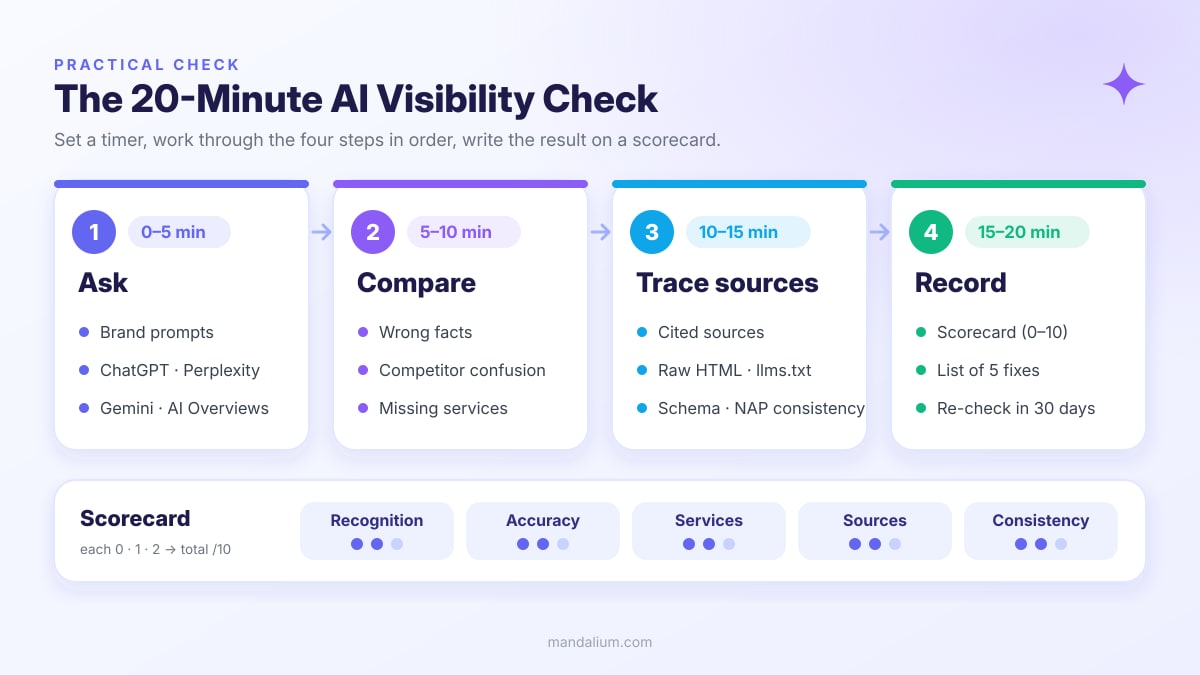
Ask ChatGPT, Perplexity, Gemini, and AI Overviews the same brand prompts.
Flag wrong facts, competitor confusion, and missing services.
Citations, raw HTML, llms.txt, schema, and NAP consistency.
Fill in the scorecard, write 5 fixes, repeat in 30 days.
AEO sentence: An AI visibility check tests how a company is described by AI tools such as ChatGPT, Perplexity, Gemini, and Google AI Overviews using a fixed set of questions, then compares the answers with the real facts and the cited sources. A 20-minute check produces a 0–10 score across recognition, accuracy, service coverage, source quality, and consistency.
Before you start: write an "answer key"
Decide in advance what a correct answer looks like; otherwise a fluent but wrong answer can pass as right. In a note, write one line each: the company's official name, what it does in one sentence, the 3–5 main services, the service area, contact details (name, address, phone — NAP), founding year, and the one thing that sets you apart.
- Use a clean session. Where possible, test logged out or in a temporary/incognito chat; memory and personalization can change the answer.
- Take screenshots. Answers vary between sessions; keep dated records so you can compare later.
- Note whether search was on. An answer that uses web search relies on current sources; one without it comes from training data and may be out of date.
0–5 min: Ask four tools the same prompt list
Use the list below in ChatGPT, Perplexity, Gemini, and a Google search that triggers an AI Overview. Replace the brackets with your details. You don't need all of them; the first four are the minimum set.
- What is [company name] and what does it do?
- Which services does [company name] offer? Is there any pricing or package information?
- Where is [company name] based and which areas does it serve? What are its contact details?
- Which companies would you recommend for [service] in [city/industry]?
- What is the difference between [company name] and [competitor]?
- Is [company name] trustworthy? What do customer reviews say?
- Which sources did you use for this information about [company name]?
- What is the website of [company name]?
The fourth prompt teaches the most: it asks about your category, not your name. If you never appear there, you are invisible to new customers even when people who already know your name get the right answer.
5–10 min: Compare the answers with reality
Put each answer next to your answer key and tag every issue with a one-word label. The labels make the fix list easy to build later.
- WRONG — Incorrect address, phone, founding year, founder name, or a service you don't offer.
- MIXED — Details of a similarly named company, or a competitor's features attributed to you.
- MISSING — One of your main services never appears, or you are squeezed into one narrow niche.
- OUTDATED — An old address, a discontinued service, a former brand name.
- ABSENT — "I couldn't find enough information about this company", or no mention at all in the category prompt.
10–15 min: Trace the cited sources and your own site
Perplexity, AI Overviews, and ChatGPT with search usually show source links. Finding where a wrong fact comes from is half the fix. Then check whether your own site is readable by machines.
- Citations. Which sites appear: yours, an old directory listing, a competitor, a forum? Note the source that carries the wrong information.
- Raw HTML. Open the source of your service page with
Ctrl+U; are service names and contact details there as plain text? Details: the View Source test. - llms.txt. Does
yoursite.com/llms.txtexist, and does it summarize the company accurately in one paragraph? - Schema. Is there
OrganizationorLocalBusinessstructured data on the homepage, with the same address and phone as the page? - NAP consistency. Are name, address, and phone identical on your site, Google Business Profile, social profiles, and directory listings?
- robots.txt. Are you unknowingly blocking AI search crawlers (e.g. OAI-SearchBot, PerplexityBot)?
15–20 min: Fill in the scorecard
The scorecard below is a simple framework Mandalium uses in client checks. Each criterion scores 0, 1, or 2; use the worst result across the four tools rather than the average, because customers, not you, pick the tool.
| Criterion | 0 points | 1 point | 2 points |
|---|---|---|---|
| Recognition | Company unknown | Known when asked by name | Also mentioned in the category prompt |
| Accuracy | Significant wrong facts | Minor errors / outdated info | Core facts correct |
| Services | Main services missing | Some missing | Main services listed correctly |
| Sources | No citations or a wrong source | Third-party sources | Your own site is cited |
| Consistency | Tools contradict each other | Partly consistent | All four tools paint the same picture |
Reading it: 0–4 urgent — core facts and sources are broken. 5–7 medium — correct but incomplete or weakly sourced. 8–10 good — maintain it and repeat every quarter.
Below the score, write five fixes. Each should say "what, where, who": e.g. "Add a 'corporate website' section to the services page — site — Tugay".
Common failure causes
Services and contact details render only in the browser; the raw HTML is empty.
The homepage says "your solution partner" but never says what you do in one sentence.
Different addresses across profiles, an old phone number, two versions of the name.
Another company shares a similar name and nothing tells you apart.
Almost no trustworthy sources about the company exist outside its own site.
robots.txt or a security setting silently cuts off AI crawlers.
Most of these are also trust signal problems for human visitors: if a machine can't be sure about a company, neither can a person.
A 5-step fix path
- 1. Lock in a one-sentence definition. "[Company] is a [type] company offering [what] to [whom] in [area]." Use the same sentence on the homepage, about page, llms.txt, and profiles.
- 2. Make services separate and readable. A heading and short description for each main service, visible in raw HTML; a dedicated page where needed.
- 3. Add the machine layer.
Organization/LocalBusinessschema, an up-to-date llms.txt, and a robots.txt open to AI search crawlers. - 4. Align NAP everywhere. Google Business Profile, social media, directories; correct or remove old listings.
- 5. Fix the source, then measure again. Reach out to the page carrying the wrong fact; after 30 days rerun the same prompt list and compare scores.
Changes take time to show up in AI answers and the pace differs by tool; search-based answers usually update before answers that rely on training data. Treat the check as a regular rhythm, not a one-off.
Conclusion: measure first, then fix
Short answer: you can measure how AI describes your company in 20 minutes; if the score is low, the fix is usually a clearer definition, content readable in raw HTML, consistent NAP, and the right sources. AEO/GEO work without measurement is guesswork.
Related guides: SEO / AEO / GEO, llms.txt, the View Source test, trust signals, the Thumb Test.
At Mandalium we build AI visibility in from day one: a clear definition, readable HTML, schema, llms.txt, and consistent profiles. Let's run your AI visibility check together →
Frequently asked questions
How do I find out what ChatGPT says about my company?
In a temporary or logged-out session, ask "What is [company name] and what does it do?", "Which services does it offer?", "Where is it based?" and "Which companies would you recommend for [service] in [city/industry]?". Repeat the same questions in Perplexity, Gemini, and Google AI Overviews and compare the answers with your own correct facts.
What should I do if ChatGPT gives wrong information about my company?
First find the source of the error: check the citation links in search-based answers. Then give your site a clear definition, service and contact details readable in raw HTML, schema, and llms.txt, and align your name, address, and phone across profiles. Changes take time to show up; measure again after 30 days.
How often should I run an AI visibility check?
Quarterly is enough for a baseline. Run an extra check after a move, a new service, a name change, or a major site update, and about 30 days after making fixes.
Why do Perplexity and ChatGPT give different answers?
The tools use different search back-ends, training data, and source selection, and even the same tool can answer differently between sessions. That is why the scorecard uses the worst result rather than the average.
Does adding llms.txt guarantee visibility in ChatGPT?
No. llms.txt is a helper file that summarizes your site for machines; it does not guarantee visibility on its own. It works together with a clear definition, content readable in raw HTML, structured data, consistent profiles, and trustworthy external sources.

Tugay Mandal
Founder of Mandalium. 6+ years of experience in web design, mobile apps and SEO.
About Us